Old stuff but I keep forgetting the command line everytime I do it again.
http://www.microsoft.com/technet/prodtechnol/WindowsServer2003/Library/IIS/750d3137-462c-491d-b6c7-5f370d7f26cd.mspx?mfr=true
Wednesday, January 21, 2009

Friday, December 19, 2008
Using Report Services on a SharePoint 2007 site
First you will need to install the reporting services add-on for SharePoint Server 2007 if you haven't already.
Second, the web parts that will be required for SharePoint to access Report Services will need to be installed.
By default, the webparts are installed with SQL Server 2005 and are located in ..\Microsoft SQL Server\90\Tools\Reporting Services\SharePoint\RSWebParts.cab.
You will need to copy this file over to front end web server and run the following command:
stsadm.exe –o addwppack –filename “<path to file>\rswebparts.cab” -globalinstall
Finally, in order to properly get the Web Parts just installed to function on a MOSS2007 setup with Reporting Services you will need to make a change on the site's web.config file. The trust level must be changed to WSS_Medium.
<trust level="WSS_Medium" originalurl="">
Second, the web parts that will be required for SharePoint to access Report Services will need to be installed.
By default, the webparts are installed with SQL Server 2005 and are located in ..\Microsoft SQL Server\90\Tools\Reporting Services\SharePoint\RSWebParts.cab.
You will need to copy this file over to front end web server and run the following command:
stsadm.exe –o addwppack –filename “<path to file>\rswebparts.cab” -globalinstall
Finally, in order to properly get the Web Parts just installed to function on a MOSS2007 setup with Reporting Services you will need to make a change on the site's web.config file. The trust level must be changed to WSS_Medium.
<trust level="WSS_Medium" originalurl="">
How to run Windows PowerShell Scripts
PowerShell scripts cannot be run by default because the ExecutionPolicy is set to Restricted by default. In order to get scripts to run you must change this.
Here is a good manual to get you up and running PowerShell scripts from Microsoft:
http://www.microsoft.com/technet/scriptcenter/topics/winpsh/manual/run.mspx
Here is a good manual to get you up and running PowerShell scripts from Microsoft:
http://www.microsoft.com/technet/scriptcenter/topics/winpsh/manual/run.mspx
How to configure an NTP server
Following two articles will aid in setting up a NTP server for a Windows Server 2003 PDC master machine.
http://support.microsoft.com/kb/816042
http://support.microsoft.com/kb/q262680
http://support.microsoft.com/kb/816042
http://support.microsoft.com/kb/q262680
Thursday, September 11, 2008
DNS: Recursion
Link for below article: http://www.techbytes.ca/techbyte31.html
DNS: The difference between "Do Not Use Recursion" and "Disable Recursion"
In the Windows 2000/2003 DNS console (dnsmgmt.msc), under a server's Properties -> Forwarders tab is the setting Do not use recursion for this domain. On the Advanced tab you will find the confusingly similar option Disable recursion (also disables forwarders).
Recursion refers to the action of a DNS server querying additional DNS servers (e.g. local ISP DNS or the root DNS servers) to resolve queries that it cannot resolve from its own database. So what is the difference between these settings?
The DNS server will attempt to resolve the name locally, then will forward requests to any DNS servers specified as forwarders. If Do not use recursion for this domain is enabled, the DNS server will pass the query on to forwarders, but will not recursively query any other DNS servers (e.g. external DNS servers) if the forwarders cannot resolve the query.
If Disable recursion (also disables forwarders) is set, the server will attempt to resolve a query from its own database only. It will not query any additional servers.
If neither of these options is set, the server will attempt to resolve queries normally:... the local database is queried... if an entry is not found, the request is passed to any forwarders that are set... if no forwarders are set, the server will query servers on the Root Hints tab to resolve queries beginning at the root domains.
Sunday, January 13, 2008
How to remove "tile" effect for images used as a background in websites
When using background images for websites you may sometime want to only have a picture as the background. But by default, the background image will "tile" to fill up all the free space.
In order to stop the "tile" effect, you can utilize CSS.
Add the following code to any tag that can use an image as a background:
style="background-repeat:no-repeat"
When using tables, there are times you may want to have the tiling effect and times you don't. In order to specify specific cells to have the desired effect you will have to create a CSS class.
styles.css
TD.NoTile { background-repeat: no-repeat; }
You would then add the required code to any of the table cells you want:

Saturday, January 12, 2008
Having cursor change when on an image map
This took quite a bit of time to find out since there wasn't much information or help online. Creating a simple image map on a graphic for use on the web is fairly simple. Using Dreamweaver for example, you can just drag the area on the image you want to map, then fill in the required information such as: Link, Target, and Alt.
When the mouse is over an image map it will by default change into a hand cursor, usually.
If you want more advance functions out of your image map, say to open a browser window when you click on it, you can utilize the "Open Browser Window" Behavior in Dreamweaver. However, when you do this, you will notice that the cursor no longer changes when the mouse is over the image map. If you have the Link property filled out for the image map with the about Behavior, then you will notice the cursor does change, but when you click on it, it will open two windows. One for the Link property and one for the Behavior.
What I noticed, is that when the Link property is used, then the cursor will change.
So how do I put something into the Link property that won't be used when clicked on?
You have to trick the image map into believing that the Link property is filled in but not utilize the Link. You do this by entering into the Link property, "Javascript:"
Here's a more detailed example:
When the mouse is over an image map it will by default change into a hand cursor, usually.
If you want more advance functions out of your image map, say to open a browser window when you click on it, you can utilize the "Open Browser Window" Behavior in Dreamweaver. However, when you do this, you will notice that the cursor no longer changes when the mouse is over the image map. If you have the Link property filled out for the image map with the about Behavior, then you will notice the cursor does change, but when you click on it, it will open two windows. One for the Link property and one for the Behavior.
What I noticed, is that when the Link property is used, then the cursor will change.
So how do I put something into the Link property that won't be used when clicked on?
You have to trick the image map into believing that the Link property is filled in but not utilize the Link. You do this by entering into the Link property, "Javascript:"
Here's a more detailed example:

Software:
Dreamweaver CS3
Using ASP.NET with IIS
This is just a little reminder post for myself when creating web site that will use ASP.NET. For any web site on IIS to be able to utilize ASP.NET, FrontPage Server Extensions will have to be extended onto the web site. To do this go to [Adminsitrative Tools] > [Microsoft SharePoint Adminstrator].
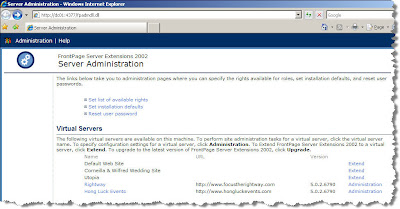
Then click on "Extend" for the web site you want to enable ASP.NET on.
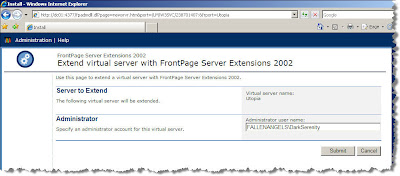
Fill in the required information then click "Submit".
Software:
IIS6
ASP .NET 2.0

Then click on "Extend" for the web site you want to enable ASP.NET on.

Fill in the required information then click "Submit".
Software:
IIS6
ASP .NET 2.0
Subscribe to:
Posts (Atom)